
Best Practices for Drafting a Comprehensive RFP for a Lone Worker Safety Monitoring Solution
Table of Contents
Define your lone worker risk profile
Conduct pre-RFP hazard assessment
Develop strategic and operational objectives
In-depth technical requirements to include in the RFP
Security, privacy, and data
Device-based solutions
Implementation, training, and success
Vendor evaluation and RFP best practices
Customer testimonials
The pilot phase
Proven success in similar lone worker environments
Service level agreements (SLAs)
The RFP as safety planning tool
Lone worker FAQs
Drafting a Request for Proposal (RFP) for your lone workers is more than a software purchase – it’s a safety‑critical, cross-functional infrastructure project for your organization. Not only can the final document drive selection of a fit-for-purpose lone worker solution, but the collaborative process—aligning departments on priorities, budgets, and risks—builds organizational clarity and accountability.
However, standard RFPs can fall short in protecting people who work alone. Lone workers face distinct, elevated risks without nearby coworker support, and gaps in your RFP can translate into gaps in emergency response—wasting budget and, more seriously, exposing workers to preventable harm.
Define your lone worker risk profile

To begin an RFP for lone worker solutions, you must define your lone worker risk profile, systematically identifying all employees who work alone across your organization. Document roles, work environments/sites, frequency and duration of solo work, and whether work occurs while mobile, after-hours, or in remote areas. An important component is the elevated risk landscape lone workers face—including workplace violence, falls, medical emergencies, environmental exposure, and psychosocial stress or isolation.
Conduct pre-RFP hazard assessment
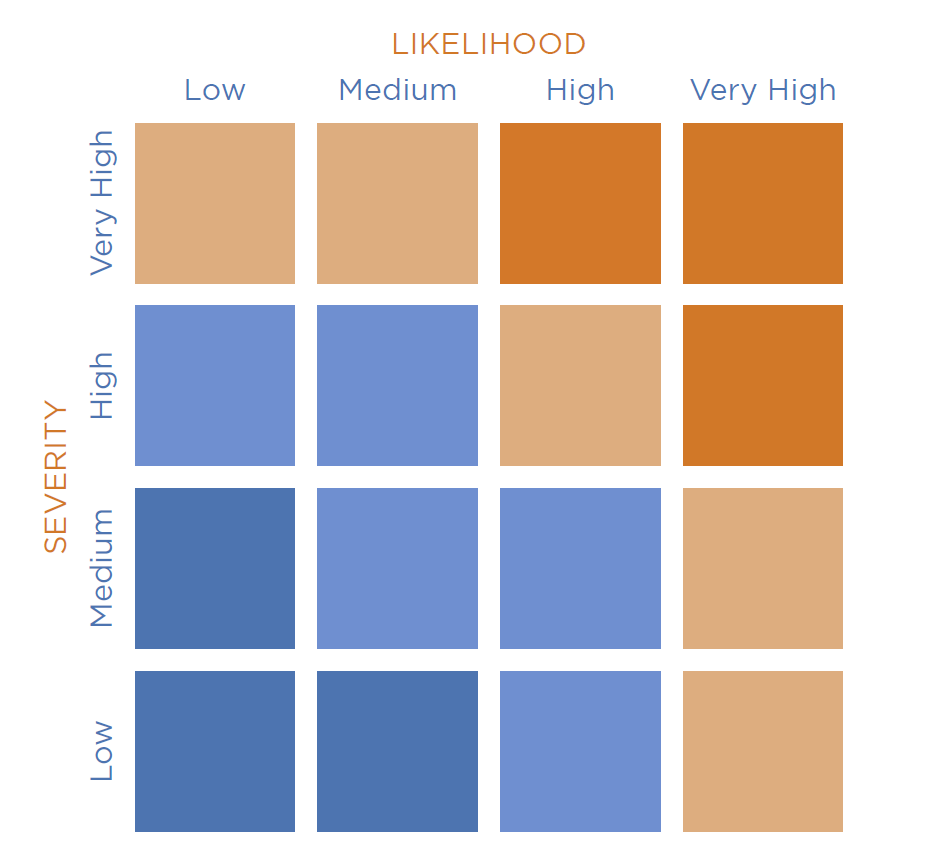
Likelihood and severity risk matrix found in the SafetyLine hazard assessment guide available to download for free.
The unique occupational risks lone workers face can be identified through early hazard assessments of their work environments or worksites. A pre-RFP hazard assessment sharpens the lone worker profile by evaluating risk based on where (e.g., remote/satellite vs. urban/cellular networks), who/role (e.g., high-hazard field operations vs. lower-risk visits), and what/source (e.g., environmental hazards, equipment risk, or human threats). This step helps you prioritize requirements and justify budget with evidence.
Develop strategic and operational objectives
Once hazards have been identified, set clear objectives and success criteria for the lone worker solution. Define measurable benchmarks—for example, alarm acknowledgment within “X” minutes, ≥99% check-in compliance for at-risk roles, or reduced time-to-know and time-to-respond during incidents.
Additionally, organizations should map the solution to current safety protocols and emergency response plans to strengthen the overall program. Align the RFP with relevant regional and industry-specific regulations (e.g., OHS, lone worker legislation) to support compliance and audit readiness.
In-depth technical requirements to include in the RFP
Why this matters: Technical requirements are the backbone of lone worker protection—your RFP should specify capabilities that maintain monitoring, location, and escalation even under low signal, device failure, or adverse conditions.
Core features
Automated check-ins: The system requires proactive confirmation at planned intervals from the worker and increased frequency in higher-risk situations.
System-side (cloud) timers: If the worker’s phone is broken or the battery dies, the check-in "timer" continues the server, so an alarm still triggers.
Panic/SOS alerts: The system provides discreet, one-touch emergency signaling that bypasses screen locks.
Motion features such as Man-down and fall detection: The lone worker solution uses device accelerometers and motion sensors to detect dangerous impact followed by immobility.
Reliable location services: If the lone worker is operating in a remote location or building, advanced, reliable location monitoring features are crucial in an effective lone worker safety solution.
GPS monitoring: The system can track the lone worker’s location using GPS technology and maps, allowing the employee to remain in contact anywhere – even beyond cellular networks.
Breadcrumbing: The GPS feature offers breadcrumbing, which displays a visual map of the worker’s last known path after checking into the system.
Resilience and connectivity layers: Additionally, the lone worker technology must be adaptable and resilient, requiring connectivity features that can benefit people working alone and in remote areas.
The "Fail-Safe" Hierarchy: Try practicing the solution between cellular, Wi-Fi, and satellite networks to determine if it can handle the transition.
Low-bandwidth optimization: Test the app and send an emergency signal or message with one bar of service.
App-based solutions: These solutions have high functionality for smartphones and are ideal for home health and urban workers.
Device Flexibility: Choose the right mix of tools to fit roles and environments; your RFP should solicit options, not pre-limit solutions.
App-based solutions: High functionality on smartphones; ideal for home health, social work, municipal inspections, and urban field staff.
Dedicated hardware: Satellite messengers, wearables, or panic buttons for heavy industry, high-risk roles, or low-connectivity environments.
Interoperability and ecosystem fit : The solution demonstrates the ability to integrate and operate within the organization’s broader technology ecosystem. This includes:
A single operational dashboard capable of monitoring workers using multiple device types (smartphones, dedicated hardware, and satellite devices).
Availability of APIs or standard integration methods to support data sharing, event triggers, and reporting, and to connect with HR platforms, EHS systems and incident management tools.
Support for exporting incident data, audit logs, and location records in commonly used formats
Monitoring, response and escalation approaches: In addition to the technical features, define who receives alerts, how they respond, and the time-bound escalation paths. Specify alarm routing logic, on-call schedules, acknowledgment requirements, and escalation deadlines (e.g., to supervisor, to central monitoring, to emergency services). Include requirements for documentation, audit trails, and incident reporting that align with industry standards.
Enterprise identity management (SSO and SCIM): The solution supports Single Sign‑On (SSO) with enterprise identity providers so workers can log in using existing corporate credentials, eliminating separate usernames and passwords. Support for System for Cross‑domain Identity Management (SCIM) enables automated user provisioning and de‑provisioning, ensuring new workers gain access immediately and access is removed promptly when roles change or employment ends. This reduces administrative overhead, improves adoption, and strengthens security and compliance.
Security, privacy, and data
When considering a lone worker safety solution, security and privacy should be a priority. Require vendors to demonstrate compliance with SOC 2 Type II certification to ensure rigorous and consistent data protection standards.
When researching mobile-based versus device-based safety solutions, mobile apps offer security advantages including:
Remote device management capabilities
Encrypted app-level communications
Automatic security updates
Biometric or passcode access controls
Device-based solutions
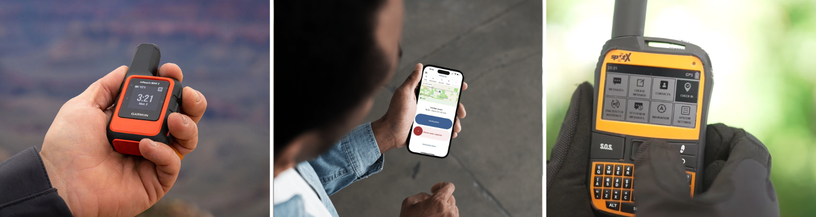
Individual, separate devices (satellite messengers, panic buttons, wearables) may be preferable in remote or high-risk environments. From a data perspective, buyers should evaluate:
Proprietary network security
Firmware update processes
Physical tamper resistance
Data transmission encryption
These solutions can introduce integration or data-access limitations and challenges compared to cloud-connected mobile apps and platforms which are easier to incorporate with current safety systems and programs.
Implementation, training, and success
A solution only works when workers and supervisors are confident using it. Specify onboarding and training requirements, including measured adoption targets, usage reporting, and check-in compliance KPIs.
Look at the vendor’s resources for ongoing support for its users, long-term relationships, as well as case studies and success stories.
Vendor evaluation and RFP best practices
Selecting a lone worker safety provider is not just a technology decision; it is a long-term operational partnership. When evaluating a lone worker solution, start by assessing the vendor’s experience with lone worker safety specifically:
Years specializing in lone worker safety
Industries served (healthcare, utilities, social services, water works, etc.)
Workforce size and deployments (small teams versus large teams, mobile versus stationary)
Geographic coverage (the size of the area the workers are located)
Customer experience (number of lone workers worked with)
Customer testimonials
When evaluating customer testimonials, note the following information where possible:
Named client organizations
Case studies with measurable outcomes
Retention rates or long-term client partnerships
Examples of success stories, incident prevention or emergency response success
The pilot phase
Requiring a pilot phase is a best practice for lone worker RFPs and allows you to validate it is effective in your operating environment. Your pilot programs should:
Run for a defined period (usually 30 to 90 days)
Assign a representative lone worker group
Test in real check-in shifts, remote locations, and working conditions
Simulate emergency alerts and escalation workflows
Proven success in similar lone worker environments
Find vendors with demonstrated success in lone worker environments comparable to yours, such as:
Remote or low-connectivity areas
High-risk client-facing roles
Overnight or isolated shifts
Hazardous industrial sites
Municipal inspections or bylaw enforcement
Service level agreements (SLAs)
Service Level Agreements are important because they formalize the vendor’s accountability and operational performance commitments.
The primary SLA components to require are:
System uptime and availability: Look for ≥99.9% uptime commitments, supported by redundancy infrastructure.
Alert monitoring and response times: If the vendor provides a monitoring center, define your maximum response time to alarms, escalation timelines, emergency services dispatch procedures.
Technical support availability: Make sure you specify that 24/7 versus business-hours support is available, emergency support channels are an option, and look at the vendor’s average ticket resolution times.
Maintenance and update protocols: Make sure the protocols for scheduled updates, advanced outage notifications, and security patch timelines are clarified.
Penalties and remedies: Include performance credits, fee reductions, or contract exit clauses if SLA thresholds are not met.
The RFP as safety planning tool
When drafting the lone worker solution RFP, involve every level of the organization at some point of the process. Because it is such a meaningful project for the organization and the safety of its workers, they need the feedback of every employee – from frontline workers to leadership and management – to choose the best solution for their team. This process engages staff and assesses current hazards, helping plan the future more effectively. Once the appropriate safety solution has been chosen and implemented into the organization, watch the culture grow from an informed decision.
Check in. Work Safe. Stay Connected. Book a demo with SafetyLine today to get started!
Frequently Asked Questions
-
Lone workers face unique risks – including isolation, delayed emergency response, workplace violence, and environmental hazards – that regular safety RFPs often overlook. A specialized RFP ensures the solution includes features like automated check-ins, man-down detection, escalation workflows, and reliable location monitoring tailored to workers operating without immediate support.
-
Look for vendors with proven deployments in similar industries and risk environments. Review case studies, customer testimonials, measurable safety outcomes, and reference clients. Experience supporting remote workers, high-risk roles, or large distributed teams is a strong indicator of solution maturity.
-
An effective RFP should involve cross-functional input, including safety leaders, operations managers, IT and security teams, procurement, frontline supervisors, and lone workers themselves. This ensures the solution aligns with real operational risks, integrates with existing systems, meets compliance requirements, and is practical for day-to-day worker use.
-
Core features typically include automated check-ins, cloud-based monitoring timers, panic and SOS alerts, fall detection, GPS tracking, and escalation management. Organizations should also require connectivity redundancy (cellular, Wi-Fi, satellite) and device flexibility to support both smartphone and dedicated hardware deployments.
-
Most organizations run pilot programs between 30 and 90 days. This allows enough time to test the system across real shifts, job roles, and connectivity environments, while simulating emergency alerts and escalation procedures to validate response effectiveness and usability.